1.2 · How the stack works
Why KVM Needs the CPU: ARM64 EL2, VHE, and the Virtualization Extension
The previous article established that KVM is a kernel module that turns the running Linux kernel into a hypervisor.
That description is accurate but incomplete, and the gap is where a lot of otherwise-solid mental models come apart. A kernel can’t simply decide to run guest operating systems at native speed. It needs the CPU’s cooperation — a hardware feature that sits dormant in the silicon until software switches it on.
This article is about that feature: what problem it solves, what it looks like on ARM64, and how it relates to the kernel module. The relationship between those last two is the part worth getting right, because “is virtualization hardware or software?” has an answer that isn’t either.
The problem: a guest kernel wants to run privileged instructions
Recall the lie from the previous article; “every guest OS believes it owns the hardware”. That belief has teeth. A kernel doesn’t just think it’s in charge; it executes instructions that only something in charge is allowed to execute. It reconfigures page tables. It writes to device registers. It masks and unmasks interrupts. It sets up the memory management unit.
Now put that kernel in a VM. It’s going to attempt all of those things, because that’s what kernels do at boot. Two options present themselves, and both are bad.
Option one: let it run them on the real CPU. The guest reconfigures the actual MMU, writes to actual device registers, and takes down the host and every other guest with it.
Option two: catch every instruction in software. Inspect each one before it executes, and when it’s privileged, emulate its effect against fake state instead of letting it touch hardware. This works. And it is how software-only virtualization operates. However, the cost is enormous. Software is now involved in every single instruction the guest runs, including the overwhelming majority that are perfectly harmless arithmetic and branches.
The insight that makes modern virtualization viable is that neither option is necessary if the CPU itself can tell the difference.
But, think about it for a second. What if the CPU can tell the difference?
The fix is in the silicon
Modern CPUs ship with a virtualization extension: a hardware feature that adds a privilege level above the normal kernel level, designed specifically for a hypervisor to occupy.
With it, the guest kernel runs at its usual privilege level, fully believing it’s in charge. Its ordinary instructions — the arithmetic, the branches, the memory accesses — execute directly on a real core at full speed, with no software involvement whatsoever. But the moment it attempts something that would affect real hardware, the CPU traps. It freezes the guest and transfers control up to the hypervisor.
This is the crucial economic property. Now the expensive interventions happen only on privileged operations, which are rare. Everything else runs native. The software now can stop babysitting and start handling exceptions.
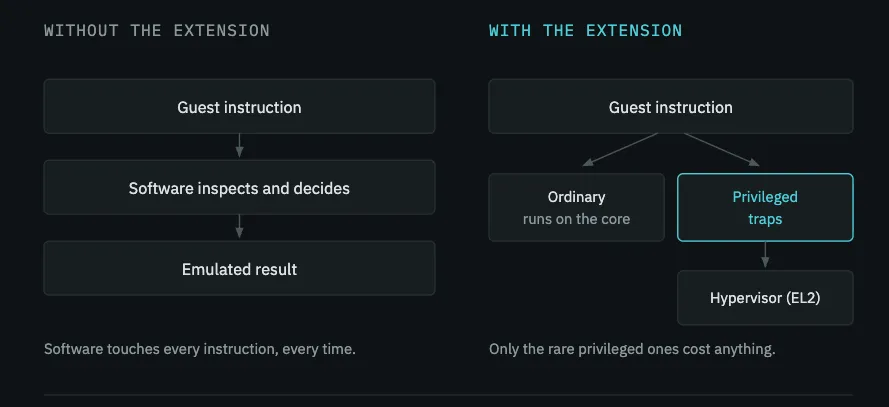
That trap is the VM exit. A VM Exit is a hardware-driven transition where control shifts from the guest virtual machine back to the host operating system hypervisor. This article establishes what causes a VM exit and why it exists; the mechanics of what happens during one — how control actually returns to userspace, what data crosses the boundary, and why some exits are far cheaper than others — are the subject of article 5.
ARM64’s privilege levels, and the x86 equivalents
ARM calls its privilege levels Exception Levels, abbreviated EL. Higher numbers mean more privilege, which is the opposite of x86’s ring numbering.
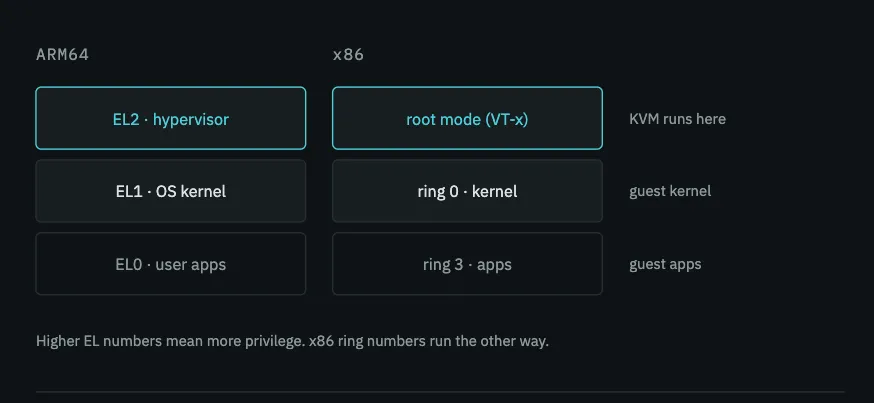
A guest’s applications run at EL0. The guest kernel runs at EL1, where it has always expected to run, and where it can do everything a kernel normally does. Above it sits EL2, the hypervisor level, which the guest cannot see or reach.
On x86 the same concept is called VT-x on Intel and AMD-V on AMD, and the additional level is described as “root mode” rather than given a number. The naming differs but the structure is the same. If you know x86 virtualization, EL2 is your root mode.
There’s a fourth level on ARM — EL3, for secure-world firmware. This is outside the scope of virtualization and not something KVM touches.
VHE: why EL2 alone wasn’t enough
The original ARM virtualization design assumed the hypervisor would be a small, purpose-built piece of software living at EL2. EL2 was designed for that: a lean environment with its own register set, deliberately unlike EL1.
Linux is not that. Linux is a large general-purpose kernel written to run at EL1, and KVM is a module inside it. Under the original design, running KVM meant splitting the kernel. So most of Linux will be at EL1, with a small stub at EL2 handling world switches. It worked, but every transition between the two carried overhead. And this split was structurally unpleasant.
VHE — Virtualization Host Extensions — fixed this. Introduced in ARMv8.1, VHE makes EL2 capable of running an ordinary EL1-style kernel directly, by remapping registers so that a kernel written for EL1 can execute at EL2 without modification. The host kernel, KVM included can run entirely at EL2. Guests run at EL1 below it. Neither split nor stub is needed now.
The practical upshot: on VHE-capable hardware, KVM runs in its efficient configuration. On older ARM cores without it, KVM still works, using the split approach. The Cortex-A76 in the Raspberry Pi 5 supports VHE. If we check the kernel boot log we can confirm this.
Seeing it on real hardware
Here’s the boot log from a Raspberry Pi 5 running Raspberry Pi OS Bookworm, kernel 6.12 aarch64:
$ dmesg | grep -i kvm
[    0.046684] kvm [1]: nv: 554 coarse grained trap handlers
[    0.046799] kvm [1]: IPA Size Limit: 40 bits
[    0.046811] kvm [1]: GICV region size/alignment is unsafe, using trapping (reduced performance)
[    0.046835] kvm [1]: vgic interrupt IRQ9
[    0.046846] kvm [1]: VHE mode initialized successfully
Every concept in this article is visible in those five lines.
VHE mode initialized successfully It confirms not just that KVM found a usable virtualization extension, but that it’s running in the modern configuration described above. The host kernel is at EL2 without a split. This is the exact moment the dormant silicon feature was switched on, recorded in the boot log.
IPA Size Limit: 40 bits refers to the Intermediate Physical Address space. This is the guest’s view of physical memory. When a guest accesses what it believes is a physical address, that’s an IPA(Intermediate Physical Address), which hardware then translates to a real host physical address. A 40-bit tracking system can create (2^{40}) unique address combinations(which is 1 Terabyte (TB) of RAM). The hardware allows the virtual machine to hold drastically more memory than your physical computer actually possesses.
vgic interrupt IRQ9 GIC (Generic Interrupt Controller): This is the physical ARM hardware chip responsible for delivering interrupts from hardware devices directly to the CPU. Guests need interrupts too. Because multiple virtual machines cannot safely share the same physical interrupt chip, KVM creates a simulated, virtual version (Virtual GIC) for each VM.
The GICV region size/alignment is unsafe, using trapping (reduced performance) line is a Raspberry Pi–specific quirk. One optimization for injecting interrupts directly into guests isn’t safely available on this hardware, so KVM falls back to trapping them. It does not affect whether acceleration works. it makes one specific interrupt path slightly slower, that is all. This is a physical trait of the Raspberry Pi chip that cannot be changed. So we ignore this warning and move on.
nv: 554 coarse grained trap handlers refers to nested virtualization support — running a hypervisor inside a guest. Not relevant to in this series.
Is virtualization silicon or software?
Now we can take on the question this article exists to answer. If virtualization is a CPU feature, why is KVM a kernel module? And if KVM is a kernel module, what is the CPU actually contributing?
They are two halves of one mechanism, and neither accomplishes anything alone.
The CPU extension is a dormant hardware capability. EL2 exists in the Cortex-A76 the moment it leaves the factory. It is baked into the silicon and does nothing on its own. It’s a feature waiting for software to claim it. Is is basically an engine with no driver.
The KVM module is the software that claims and drives it. When KVM initializes, this is the sequence:
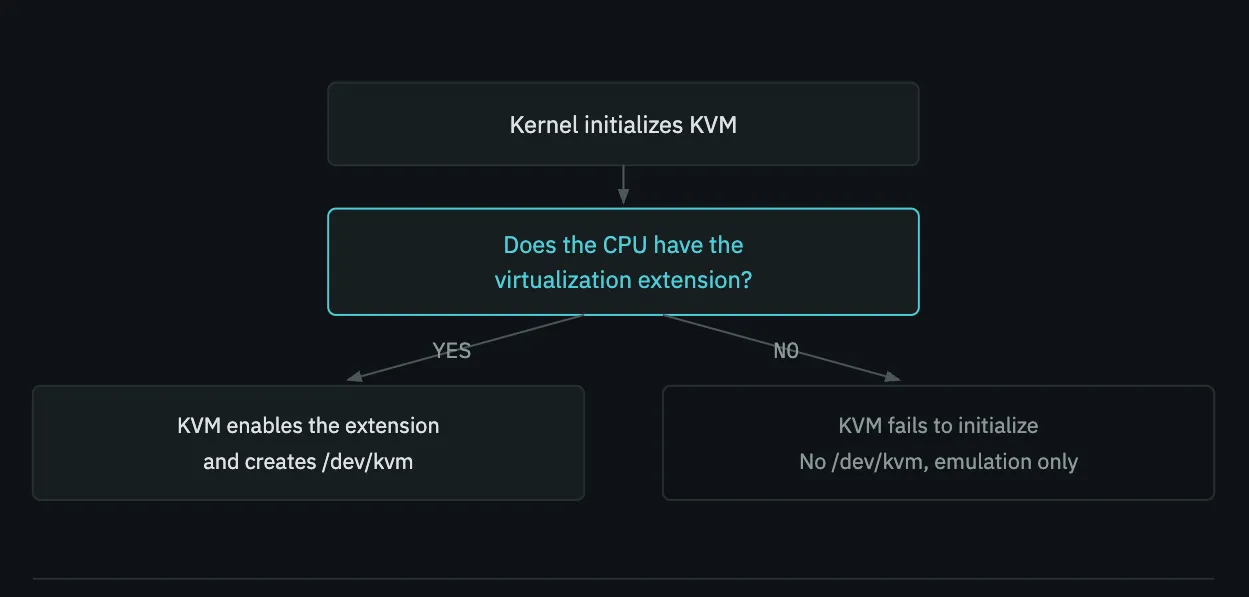
/dev/kvm is proof the whole chain worked.So the answer to “is virtualization hardware or software” is that it’s a partnership with a strict dependency. The extension without KVM is an unused silicon feature. KVM without the extension has no job. It exists solely to drive that hardware, and it will refuse to initialize on a CPU that lacks it.
This dependency has a useful consequence: the existence of /dev/kvm is proof the whole chain worked. Beacause, that file is created only when KVM has successfully initialized against a real virtualization extension. If it is there, the silicon feature is present, the software found it, and the door is open. That’s why every KVM troubleshooting guide starts by checking for it, and it’s the first command in article 7.
What happens when the extension is absent
This is worth stating explicitly, because it clarifies the boundary. If a CPU has no virtualization extension, you are not stuck. You can virtualize but you’re just slow.
QEMU(Quick Emulator) is a complete machine emulator independent of KVM. It is a software program that emulates and virtualizes computers.
QEMU can mimic an entire computer hardware system in software. It lets you run an operating system made for one processor (like an ARM chip) on a completely different processor (like an Intel laptop chip) by translating the code step-by-step instruction by instruction. And QEMU can do this without any hardware support. It works. It’s simply far slower and you can guess why. Because software is translating guest instructions rather than letting them run on a real core.
But, if you pair QEMU with a kernel module like KVM, it drops the slow software translation. Instead, it passes instructions directly to your real CPU cores, letting the virtual machine run at near-native hardware speed.
   QEMU alone   = full machine in software    → works, slow
   QEMU + KVM   = QEMU does devices,          → works, fast
                  KVM rides the CPU extension
                  for CPU and memory
   KVM alone    = impossible — KVM only does CPU and memory.
                  It can't be a disk or a NIC. It always needs QEMU.
That third line is the setup for the next article, and there’s a consequence of the second because it’s specific to ARM64 hosts.
KVM can only accelerate guests whose instruction set matches the host’s. An aarch64 guest on an ARM64 host runs natively. The Cortex-A76(like in a Raspberry pi 5) executes the guest’s instructions directly, so KVM applies and it’s fast. An x86 guest on the same host cannot. Because, those aren’t ARM instructions, and no extension makes a real ARM core execute them. QEMU falls back to full software translation.
This isn’t a limitation of KVM or of the Raspberry Pi. It’s the boundary of what hardware acceleration means. Acceleration requires the guest and host architectures to match; when they don’t, you’re emulating, and emulation is slow. Anything in this series involving KVM assumes aarch64 guests.
Remember: Hardware acceleration always requires the guest and host architectures to match, regardless of whether you are using ARM or x86.
Summary
- A guest kernel executes privileged instructions. Letting them touch real hardware is unsafe; catching every one in software is slow.
- CPU virtualization extensions solve this by adding a privilege level above the kernel. Guest code runs natively until it does something privileged, which traps to the hypervisor. That trap is a VM exit.
- On ARM64 the hypervisor level is EL2, above EL1 (kernel) and EL0 (user). The x86 equivalent is VT-x/AMD-V root mode.
- VHE lets a full Linux kernel run at EL2 unmodified, which is the efficient configuration KVM uses on modern ARM cores.
dmesgreports it at boot. - The silicon extension and the KVM module are partners: the extension is dormant hardware, KVM is the software that switches it on. Neither works alone, and KVM refuses to initialize without it.
/dev/kvmexisting is proof the partnership succeeded.- KVM only accelerates guests matching the host architecture. x86 guests on ARM64 fall back to slow software emulation.
Comments