1.1 · How the stack works
What a Hypervisor Is, and Where KVM Fits (Type-1 vs Type-2)
This series builds the KVM/QEMU/libvirt stack starting from the silicon on ARM64. Commands are from a Raspberry Pi 5 (8 GB) running Raspberry Pi OS Bookworm, kernel 6.12 aarch64. Note that, Every command is aarch64-native, and the terminal output is real. The concepts, however, apply anywhere Linux runs. I chose ARM64 deliberately, because almost every KVM tutorial out there is written for x86.
The first question to start with is: what is a hypervisor, and which kind is KVM?
Virtualization works on a lie!
A normal computer runs one operating system, and that OS believes it owns the hardware. It believes all the RAM, every CPU core, the disks, and the network interface belong to it. This belief is not a simplification for beginners. It is baked into how kernels are written. A kernel executes privileged instructions, sets up memory maps, talks directly to devices, and assumes nothing exists above it.
A hypervisor is what lets several of those operating systems, each believing “I own everything”, run on one machine. Each of them keeps believing the lie. The hypervisor’s job is to keep that lie convincing enough and quietly share the real hardware underneath.
Everything else I will be writing about in this series, like VM exits, VirtIO, virtqueues, and passthrough, is a technique for maintaining that lie either more convincingly or more cheaply.
The types of hypervisors
The textbook taxonomy divides hypervisors in two:
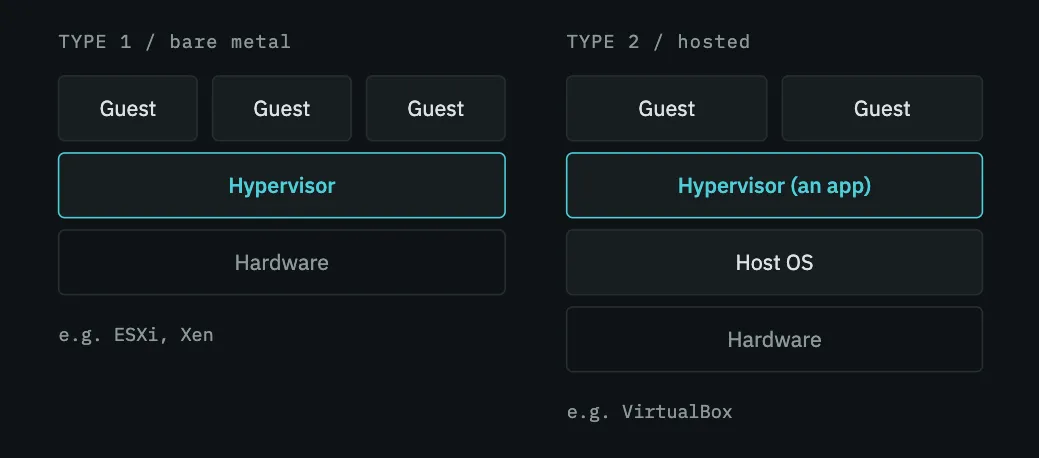
Type 1 hypervisors run directly on the hardware. There is no general-purpose OS underneath them, which means the hypervisor is the thing the machine boots into. ESXi and Xen are the standard examples. What you get in return is performance and isolation. Because, the hypervisor is the sole layer separating a guest from the hardware, and there is nothing else in the way.
Type 2 hypervisors run as applications on top of a normal operating system. We boot Linux, macOS, or Windows on our computers, then install a program like VirtualBox and launch it the same way we’d launch a browser. Here, what you get in return is convenience. Your usual desktop environment carries on exactly as before, and a virtual machine also ends up being just another application running alongside everything else.
People usually summarise the difference as a choice between speed or convenience.
Where is KVM located. And is it type-1 or type-2 ?
KVM(Kernel-based Virtual Machine) is a kernel module. Once it is loaded, the Linux kernel itself becomes the hypervisor. There is no separate hypervisor layer above or below it. The kernel you are already running gains the ability to execute guests directly on the hardware. I meant literally, not as an analogy. There is only one kernel here. It runs the ordinary applications, and it runs virtual machines too.
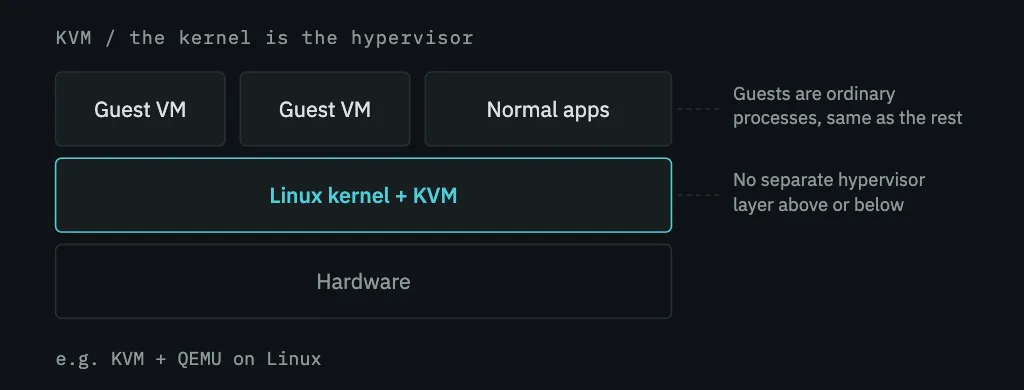
Now let’s try to place that on the Type-1/Type-2 chart.
It has Type-1’s defining property: the hypervisor communicates directly to the silicon, without an intermediary OS between it and the hardware. Guest code runs on real cores at native speed. There is no translation layer and no host kernel being asked to relay requests on the guest’s behalf. The Type 1 label was invented to describe hypervisors that let guests run at full speed. KVM does exactly that, so by that reasoning, it belongs in the category.
But it is inside a general-purpose operating system that is simultaneously running SSH sessions, your browser, and a few dozen daemons. Your VMs appear in ps output. They’re scheduled by the ordinary Linux scheduler, they are killable with kill, and constrained by cgroups like any other process. So, by the structural argument, that’s unmistakably Type 2.
This is why the argument never gets settled. People usually call KVM, “Type-1-ish”, and that hedge is fair. Because, the two categories were named before anything like KVM existed.
The practical consequence of this categorization
Because the hypervisor is part of a full Linux kernel, it inherits everything that kernel already knows how to do. It doesn’t need its own scheduler, because Linux has one, and vCPUs become ordinary threads on it. It doesn’t need its own memory manager, driver model, filesystem layer, or a network stack. Because linux has all of them. A dedicated Type-1 hypervisor has to build or port every one of those.
This inheritance is going to shape this whole series. When we pin vCPU threads to physical cores, we’ll be using the ordinary Linux scheduler affinity mechanism, because a vCPU is just a thread!. When guest disks turn out to be files in a directory, that’s the host filesystem doing its normal job. Later when we bridge guest networking, we’ll use the same Linux bridge that would connect any two interfaces.
The more important point is the flip side: KVM is intentionally minimal. Its responsibilities begin and end with the CPU and memory. It does not know how to present itself as a disk, a network card, a display, or a USB port, and it was never designed to. The reason is that it does not need to. Inside the Linux kernel, mature subsystems already exist for storage, networking, and device management, and above the kernel, in userspace, QEMU takes care of whatever remains.
That naturally leads to the question of how the work is actually split between these pieces. Article 1.3 in this series answers it. Before we get there, though, one thing needs to be cleared up, because saying that “the kernel becomes the hypervisor” ignores something important. A kernel cannot simply choose to run guest operating systems at native speed. It requires the processor to cooperate, and that cooperation comes from a hardware capability built into the silicon that stays inactive until software explicitly enables it.
On ARM64 that feature is EL2, and it is where I will start in [the next article].
Summary
- A hypervisor lets multiple operating systems each believe they own the hardware, and shares the real hardware underneath.
- Type 1 runs directly on hardware (ESXi, Xen). Type 2 runs as an application on a host OS (VirtualBox).
- KVM is a kernel module that turns the running Linux kernel into a hypervisor. Guest code executes directly on real cores, but guests are also ordinary Linux processes.
- It’s Type-1 by the performance argument and Type-2 by the structural one, hence “Type-1-ish”. The taxonomy predates the design.
- Because the hypervisor is part of Linux, it reuses Linux’s scheduler, memory manager, and drivers. Which is why KVM itself only handles CPU and memory.
Comments