1.3 · How the stack works
KVM vs QEMU vs libvirt: Who Does What
The previous article covered the CPU virtualization extension and how KVM drives it.
“What’s the difference between KVM and QEMU?” is one of the most-asked questions in Linux virtualization. If you look around most answers just stack definitions on top of each other. For me, definitions are easily forgotten. I think the best way is to build the causal chain—understanding that each component exists specifically to solve a limitation left behind by the layer beneath it. So, rather than defining everything upfront and hoping you connect the dots, I will start with KVM’s deliberate boundaries and follows the architectural consequences all the way up.
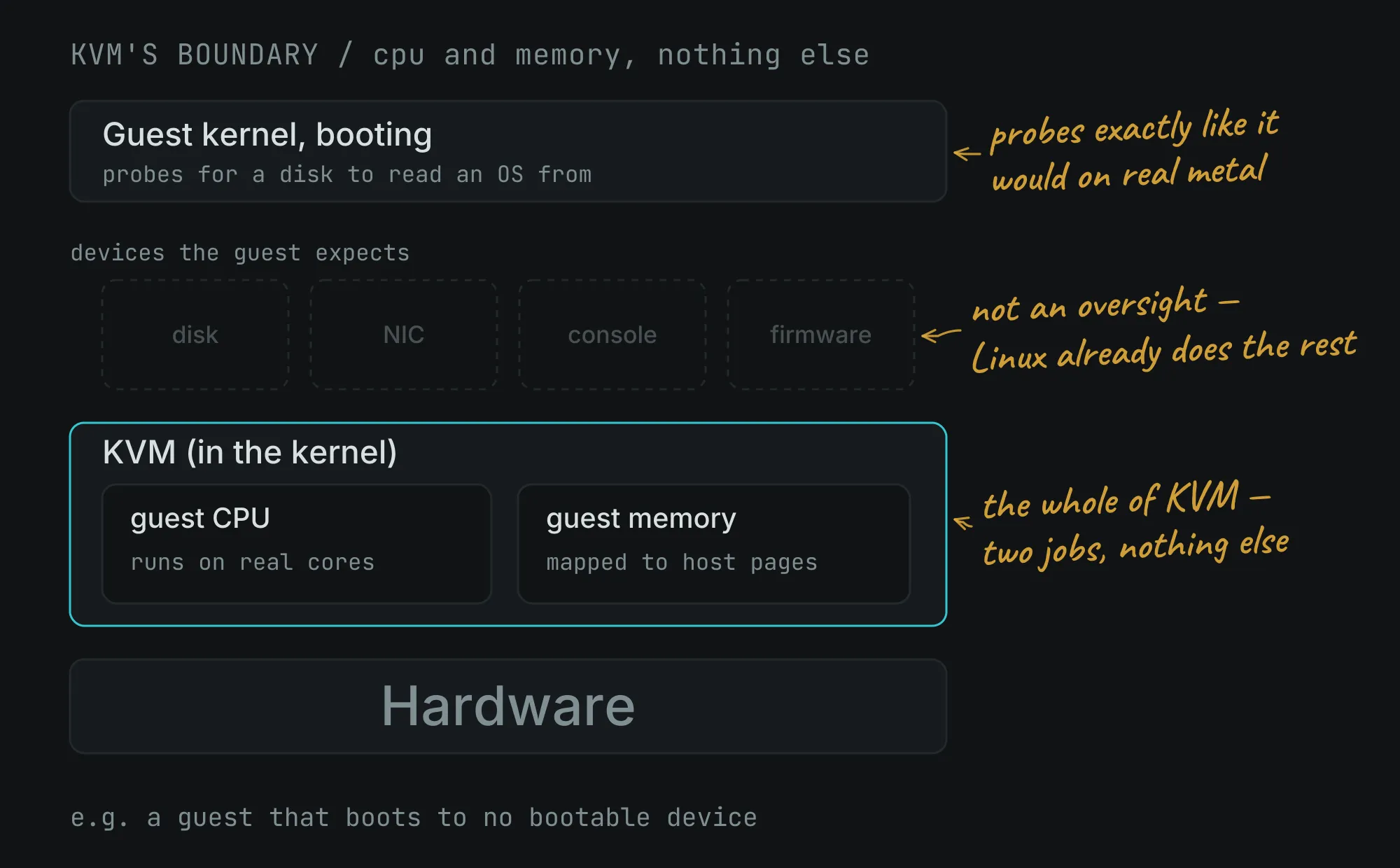
KVM only virtualizes the CPU and Memory. Nothing else.
The previous article established what KVM(Kernel-based Virtual Machine) contributes. KVM drives the CPU’s virtualization extension so guest code executes natively on real cores, trapping only on privileged operations. It also manages guest memory by mapping the guest’s idea of physical addresses onto host pages, and keeping each guest confined to its own.
KVM is incredibly efficient at executing CPU instructions and managing guest memory at near-native speed. But it only virtualizes the CPU and Memory. Nothing else.
A naked CPU and raw RAM do not make a computer. A virtual machine needs a motherboard, a PCI bus, a keyboard, a mouse, a graphics card, serial ports, and disk controllers. And KVM deliberately includes none of these hardware simulations. So, if you only had KVM, your virtual machine couldn’t boot because it wouldn’t have a virtual hard drive to read an OS from, or a virtual screen to display it.
You need to keep this in mind. This is NOT an oversight. It is a design decision, and article 1 explained why: because the hypervisor lives inside a full Linux kernel, it inherits everything Linux already does well. Building device emulation into KVM would mean duplicating work the kernel and userspace already handle.
So KVM leaves an obvious gap. A guest kernel boots, probes for a disk, and finds nothing. We need something that can answer.
QEMU Fills the Hardware Gap: It pretends to be all the devices
Because KVM leaves the virtual machine without a “body,” it needs a partner. QEMU(Quick Emulator) is a userspace program that emulates an entire machine’s worth of devices. When the guest probes for a disk controller, QEMU responds. When the guest writes a byte to a serial port, QEMU receives it. When the guest sends a network packet, QEMU hands it to the host’s network stack.
This reveals the exact handoff between KVM and QEMU. When the guest tries to talk to a hardware device, KVM intercepts the request because KVM doesn’t know how to handle hardware. KVM pauses the VM and hands the request up to QEMU. Inside QEMU, a piece of C code pretends to be the chip the guest is looking for, handles the data, and tells KVM to let the guest resume. Every piece of “hardware” the guest sees is just an illusion written in software. Article 4 covers how that actually works, since “emulates devices” is doing a lot of quiet work in that sentence.
QEMU can also emulate a CPU. On its own it’s a complete machine emulator. So, even if you don’t give it a KVM, it will translate guest instructions in software and boot an OS anyway, slowly. But if you pair it with a KVM, it hands the CPU and memory job to KVM and keeps only the devices.
That pairing is what a running VM is:
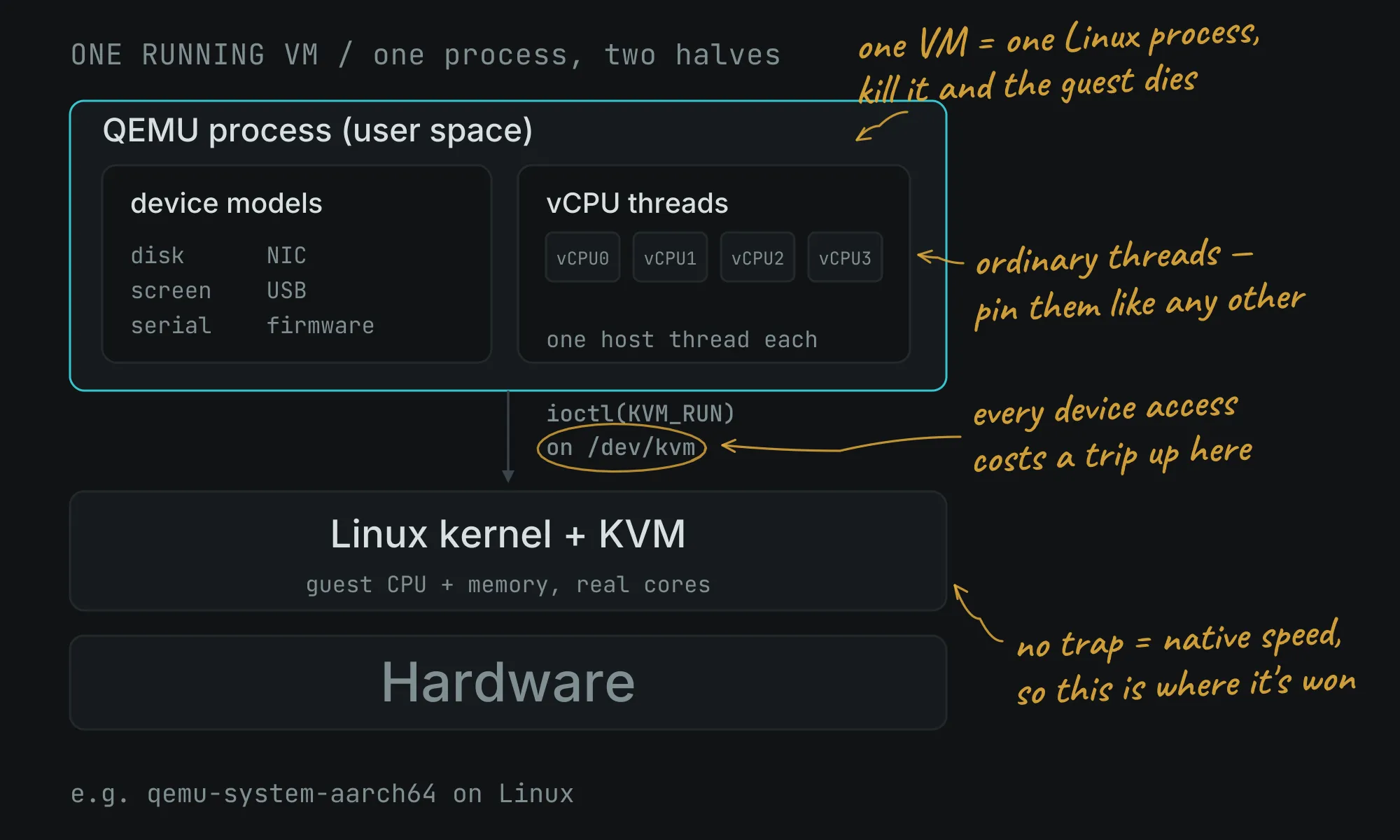
This architecture leads to two structural realities that govern how virtual machines behave on a live Linux system:
One VM is one QEMU process. A virtual machine is not a mysterious container or a cluster of workers. It is a single, standard Linux process (like qemu-system-x86_64 or qemu-system-aarch64) running in user space. qemu-system-x86_64 and qemu-system-aarch64 are examples. qemu-system-x86_64 process emulates a 64-bit Intel / AMD (x86_64) architecture and qemu-system-aarch64 emulates 64-bit ARM (ARM64 / AArch64) architecture. They are executable programs that run as processes on your operating system. So, in your task manager (like top or htop on Linux/macOS, or Task Manager on Windows), you will see qemu-system-x86_64 or qemu-system-aarch64 listed as an active process. If you kill that process, the VM instantly dies. If a guest has four vCPUs, that single process simply spins up four ordinary Linux threads. Each thread runs a continuous loop: execute guest code, halt when something traps, handle the intercept, and resume. Because these are standard host threads, the Linux scheduler manages them normally, which is exactly why you can pin specific vCPUs to physical CPU cores using standard Linux tools.
The two halves exist in a constant state of handoff Because KVM only handles CPU and memory, it runs guest code at native hardware speed right up until the guest tries to interact with a device (like writing to a disk or sending a network packet). KVM cannot handle this, so it pauses the vCPU thread and yields control back up to QEMU. QEMU’s C-coded device model simulates the hardware response, updates the virtual state, and tells KVM to resume execution. That handoff is article 5.
So KVM and QEMU together are a complete machine. Which raises the next question: how do you actually start one?
libvirt: Turning a Messy Command Into a Permanent Document
There is the problem with QEMU as a user interface. Describing a virtual machine to it means you have to to pass every single hardware detail as a raw command-line flag.
To launch a standard VM, you have to manually specify each disk’s format and bus type, every network interface’s model and host backend, the exact firmware paths, the CPU microarchitecture, the serial console configurations, and the explicit memory layout. A realistic, production-ready QEMU invocation easily runs to dozens of flags across multiple lines of unreadable text.
Nobody wants to type that. More importantly, nobody wants to remember it.
Libvirt solves this by making the VM a document rather than a command.
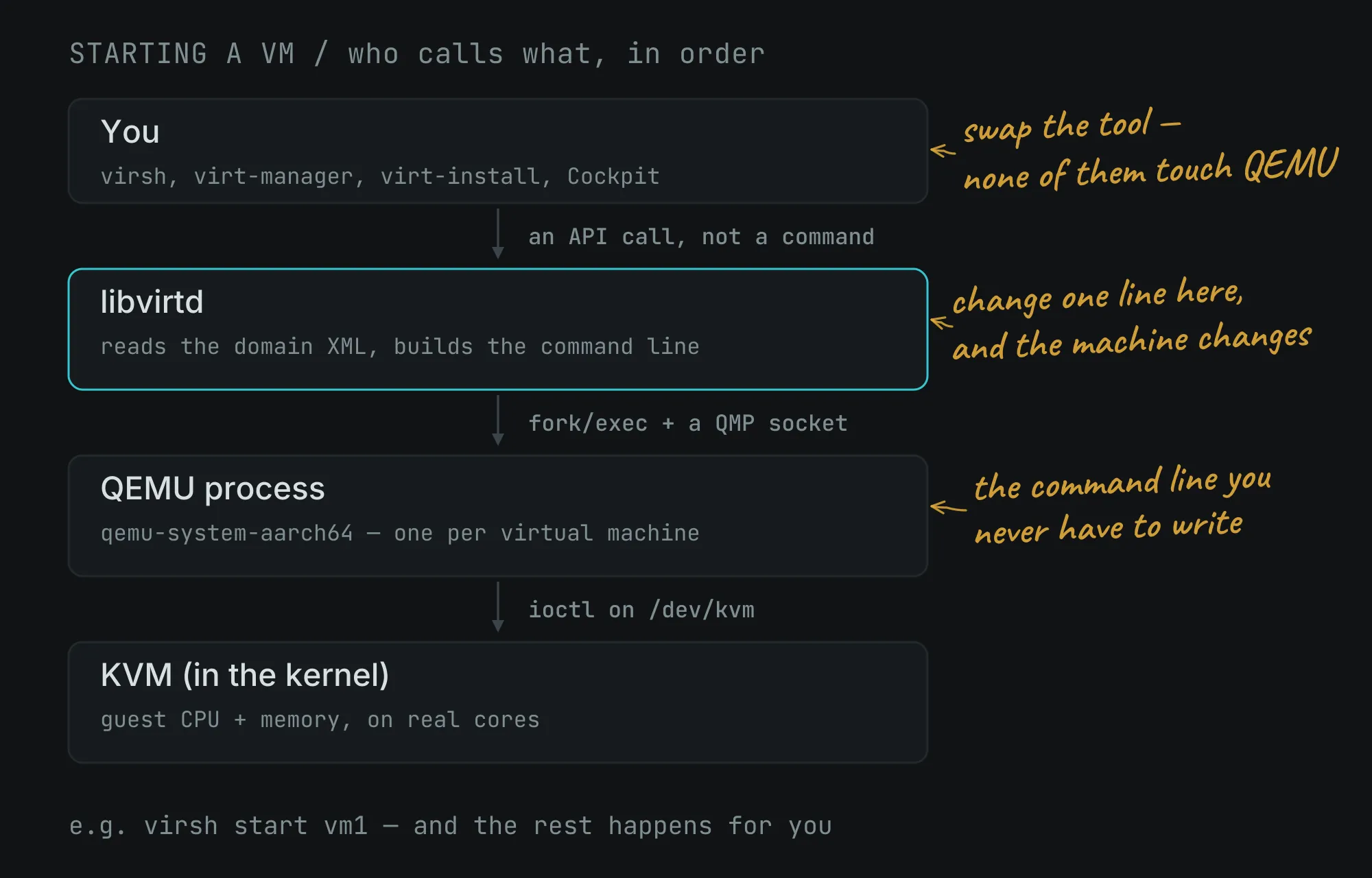
Instead of writing a transient shell script, you describe the machine’s desired state once in a structured XML file. The Libvirt daemon (libvirtd) reads that XML, dynamically constructs the corresponding, massive QEMU command line behind the scenes, launches the process, and tracks its lifecycle from that moment forward.
The Broader Scope: Managing the Ecosystem
libvirt’s scope is broader than launching processes. It defines and manages virtual networks, storage pools, and snapshots. It exposes a stable API, so tooling written against libvirt keeps working across QEMU versions. And it maintains a control channel to each running QEMU — the QMP socket — which is how a running VM can have a disk hot-plugged or a snapshot taken without restarting.
The tools you type are all front-ends to that daemon. virsh is the command-line client and the one this series lives in. virt-manager is a desktop GUI. virt-install creates new VMs. Cockpit provides a web interface. None of them talk to QEMU directly — they all send API calls to libvirtd, which does the work.
The payoff is that the XML is the VM. There’s no hidden state elsewhere. Change a line in the document and you’ve changed the machine. That’s why the domain XML is the central artifact of libvirt work, and it’s the subject that opens the next phase of this series.
Libvirt’s responsibility doesn’t end once the QEMU process is running. Its scope is much broader than launching processes. Libvirt defines and manages the entire virtualization ecosystem, including virtual networks, storage pools, and snapshots.
By exposing a stable, unified API, Libvirt ensures that any tooling written against it keeps working seamlessly across different QEMU versions. This shields you from breaking changes in upstream software.
The Frontends: Just Messengers for the Daemon
Because Libvirt acts as the central brain, the tools you actually type or click are just thin frontends to the daemon:
virsh– The powerful command-line client (and the core focus of this series).virt-manager– A traditional desktop GUI for visual management.virt-install– A specialized CLI tool dedicated to provisioning new VMs.Cockpit– A modern, browser-based web interface for server management.
None of these tools talk to QEMU directly. They all send standard API calls to libvirtd, the Libvirt daemon. It executes the heavy lifting behind the scenes.
The ultimate payoff of this architecture is simple: the XML is the VM. There’s no hidden state elsewhere. If you change a line in that document, you change the machine. Because the domain XML is the absolute central artifact of Libvirt, it is the exact subject that will open the next phase of this series.
The three sentences
Compressed to their essentials:
- KVM runs the guest’s CPU and memory on real hardware at native speed.
- QEMU pretends to be all the devices the guest thinks it has.
- libvirt stores your VM as XML and drives QEMU so you don’t have to.
Definitions are handy, but the causal version is far more useful because it explains exactly why the Linux virtualization stack has this specific shape:
KVM is lightweight because Linux already provides everything except raw CPU virtualization. That leaves peripheral hardware unhandled. So, QEMU steps in to simulate devices in userspace. However, QEMU’s resulting command-line interface is completely unusable by hand, so Libvirt abstracts it into a clean, permanent document and manages it for you.
If you want to test your understanding of this stack, imagine pulling a single brick out of the wall. And see what happens:
- Without Libvirt: Everything still runs fast and has hardware, but you are stuck hand-writing, troubleshooting, and maintaining enormous, brittle command lines.
- Without QEMU: Your virtual machine has a hyper-fast brain but no body. The guest has no virtual motherboard, network card, or disk to boot from.
- Without KVM: Everything still works perfectly, and your guest has all its devices. But, it just runs painfully slow completely in software emulation.
What this means for the rest of the series
The division of labour is a map for everything that follows.
Storage work — disk formats, snapshots, thin provisioning — is about what QEMU’s virtual disk points at on the host.
Networking work is about what QEMU’s virtual NIC plugs into: a NAT bridge, a LAN bridge, a TAP device.
Performance work splits across the boundary. Replacing emulated devices with VirtIO ones is QEMU-side. Pinning vCPU threads to physical cores is host-scheduler-side, and possible only because those threads are ordinary Linux threads.
Passthrough is the exception that proves the rule: it bypasses QEMU’s emulation entirely and hands a guest real hardware.
Every one of those is a modification to one part of a machine whose shape you now know.
Summary
- KVM handles guest CPU and memory only. It has no device emulation at all, by design, because Linux already provides everything else.
- QEMU fills that gap: a userspace program that emulates disks, NICs, consoles, and firmware. It can emulate a CPU too, but hands that job to KVM when available.
- One running VM is one QEMU process, with one host thread per vCPU.
- libvirt exists because QEMU’s command line is impractical to write by hand. It stores each VM as XML, builds the command line, launches QEMU, and manages it via a control socket.
virsh,virt-manager,virt-install, and Cockpit are all front-ends to thelibvirtddaemon.- The domain XML is the VM — there’s no hidden state elsewhere.
Comments